House Manual
Tap any section to expand.
A basic first aid kit and fire blanket are located on the bottom shelf of the kitchen pantry.
If you use any supplies from the first aid kit, please let us know via the Airbnb app so we can restock before the next guests arrive — we really appreciate it.
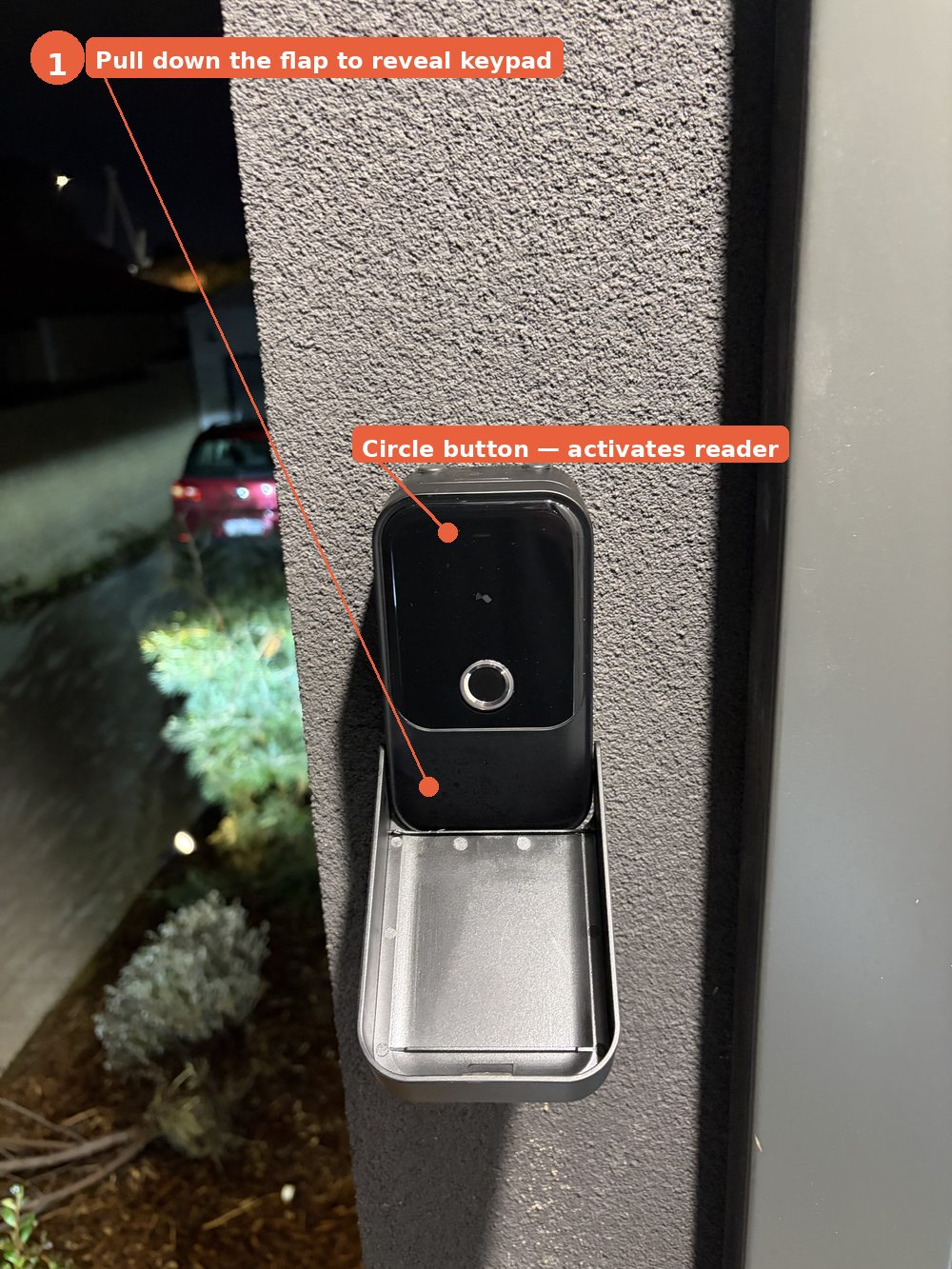
The lockbox is mounted on the wall to the left of the front door. Your unique 6-digit access code was sent to you at the time of booking.
How to open the lockbox:
- Pull down the flap at the bottom to reveal the keypad
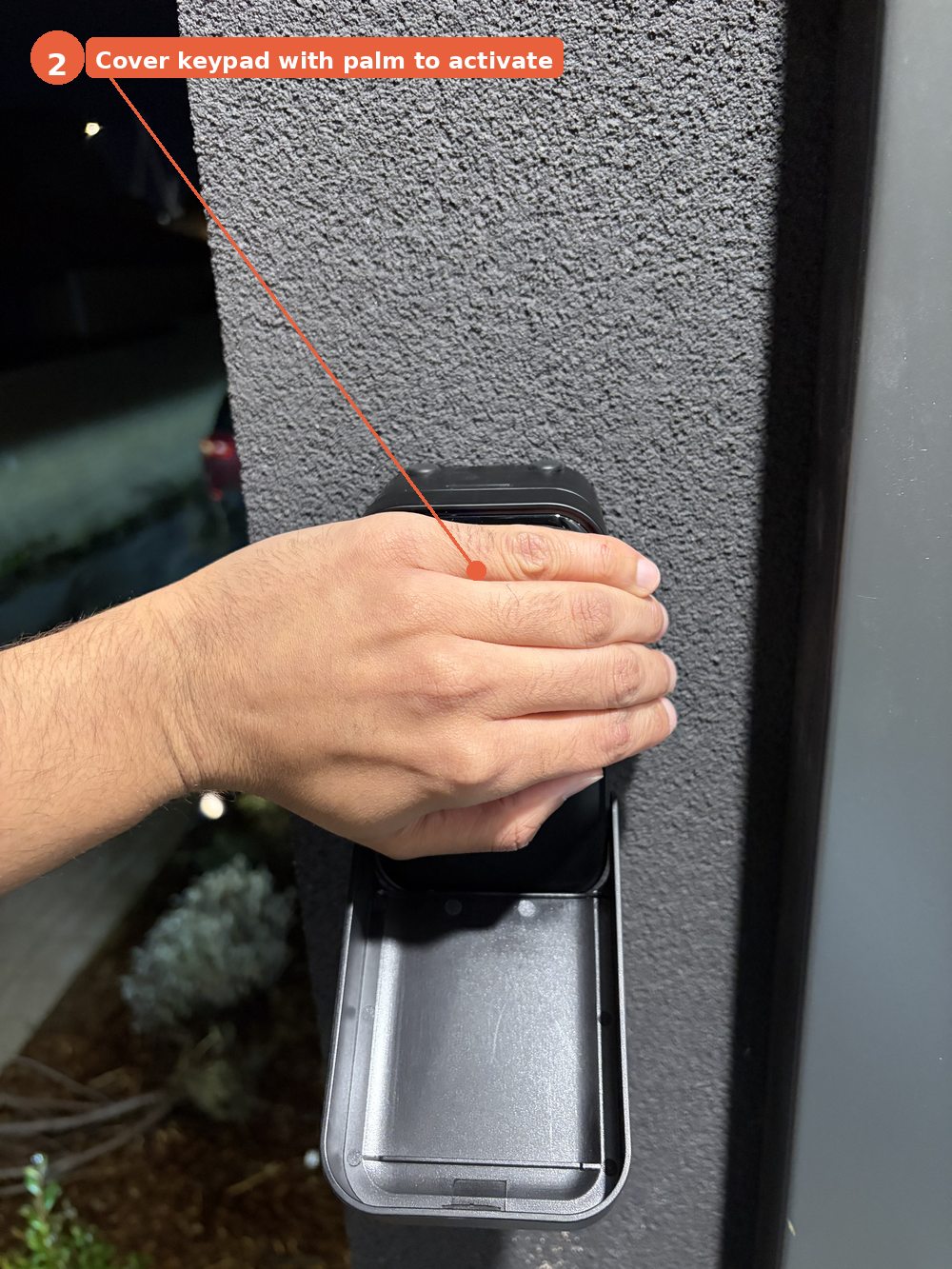
- Cover the keypad area with your palm — this activates the reader (you'll feel it respond)
- Enter your 6-digit code followed by the ✓ tick button
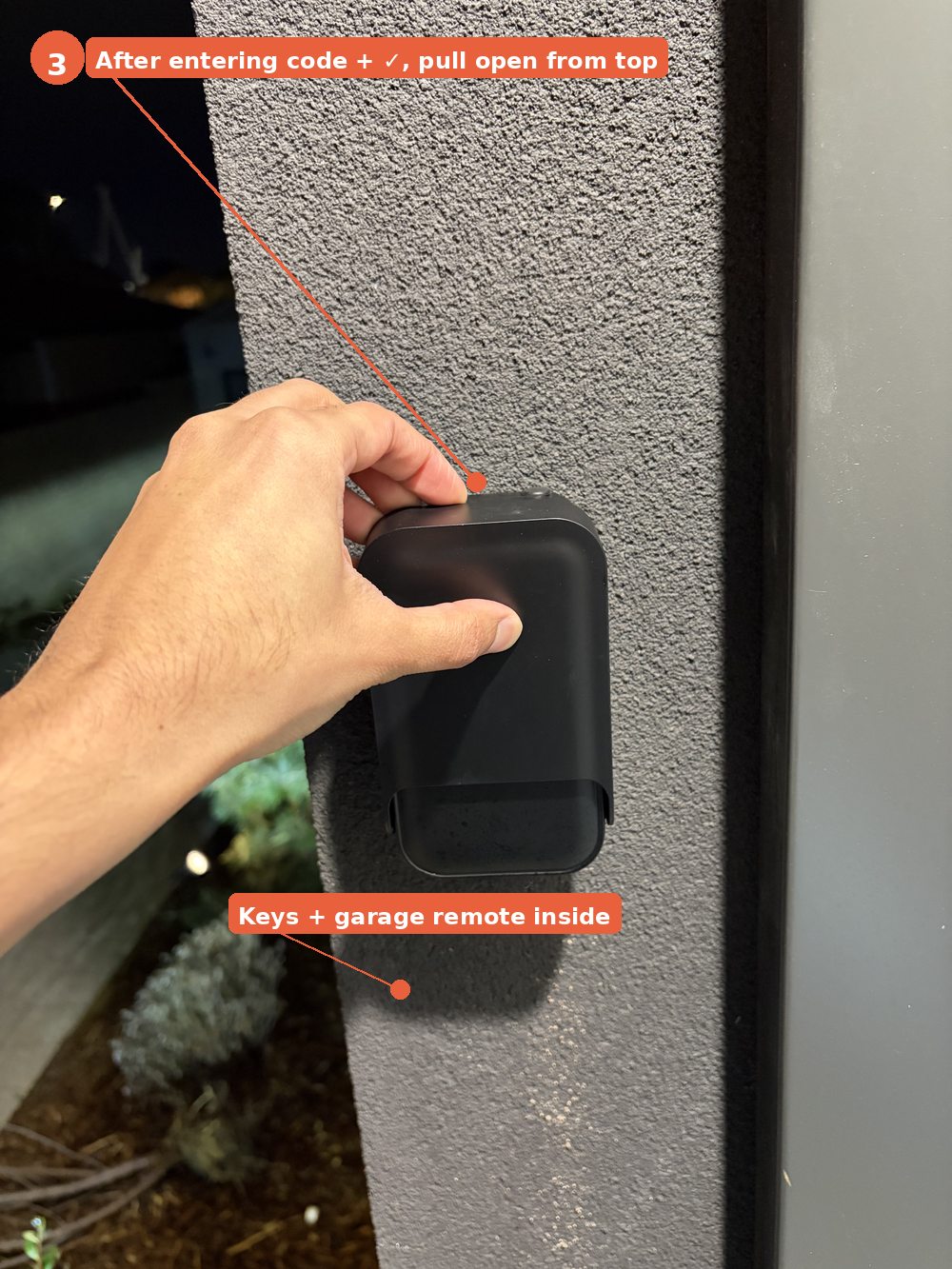
- Pull open the lockbox from the top to access the keys
What's inside:
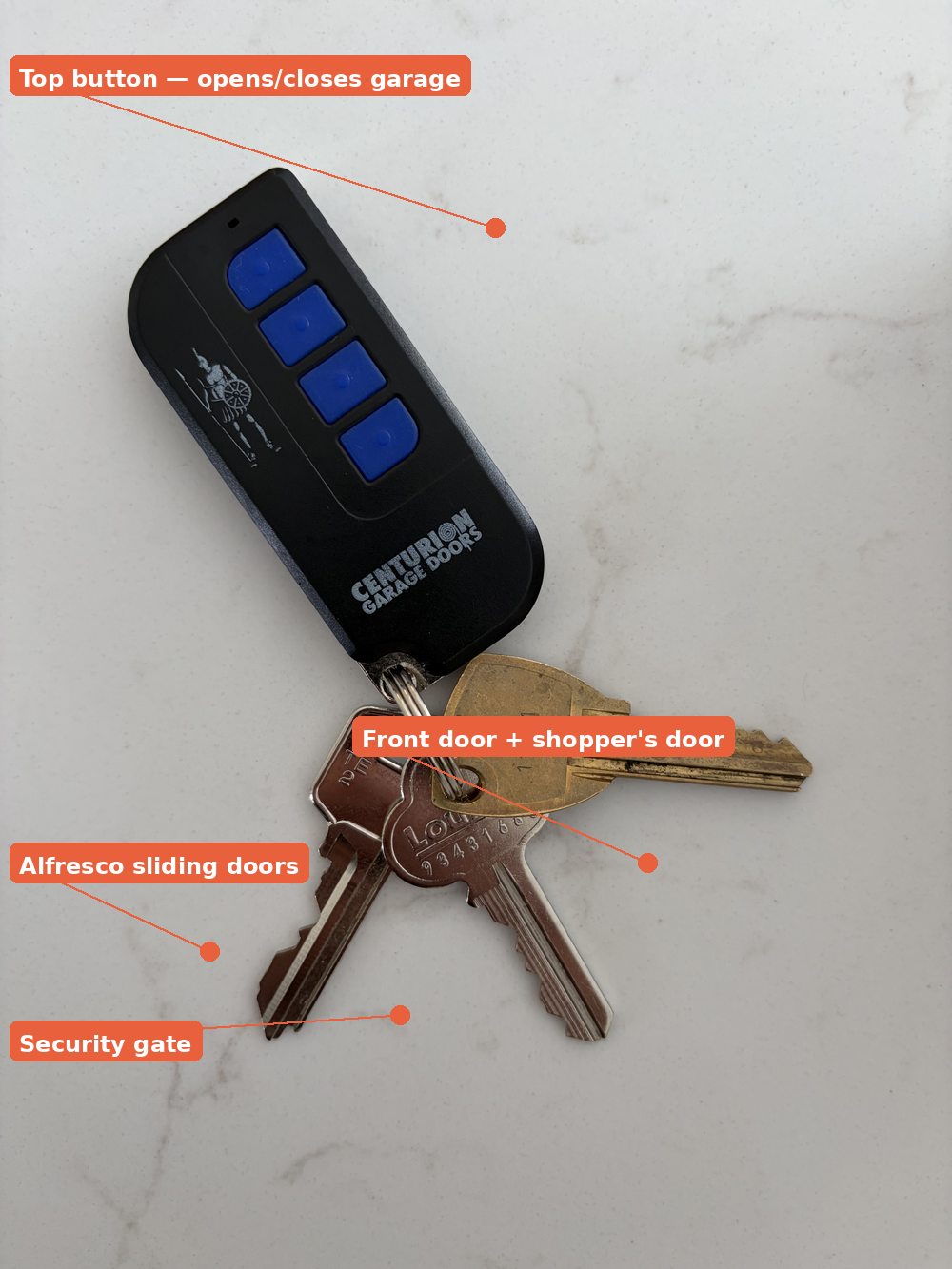
Guest vehicles must be parked inside the garage. To open the garage, use the remote control found inside the lockbox, or the wall-mounted button inside the garage.
Parking in the driveway is strictly prohibited — please ensure all vehicles are inside the garage before retiring for the evening.
Or scan this QR code with another device:
If you have any trouble connecting, please feel free to reach out.
The TV remote is on top of the TV unit.
The following are available for your enjoyment during your stay:
Netflix does not have parental controls enabled, so we kindly ask parents and guardians to supervise younger guests' viewing.
The home has ducted air conditioning with 4 individual zones — Living, Master, Bed Right, and Bed Left — so you can heat or cool exactly where you need it.
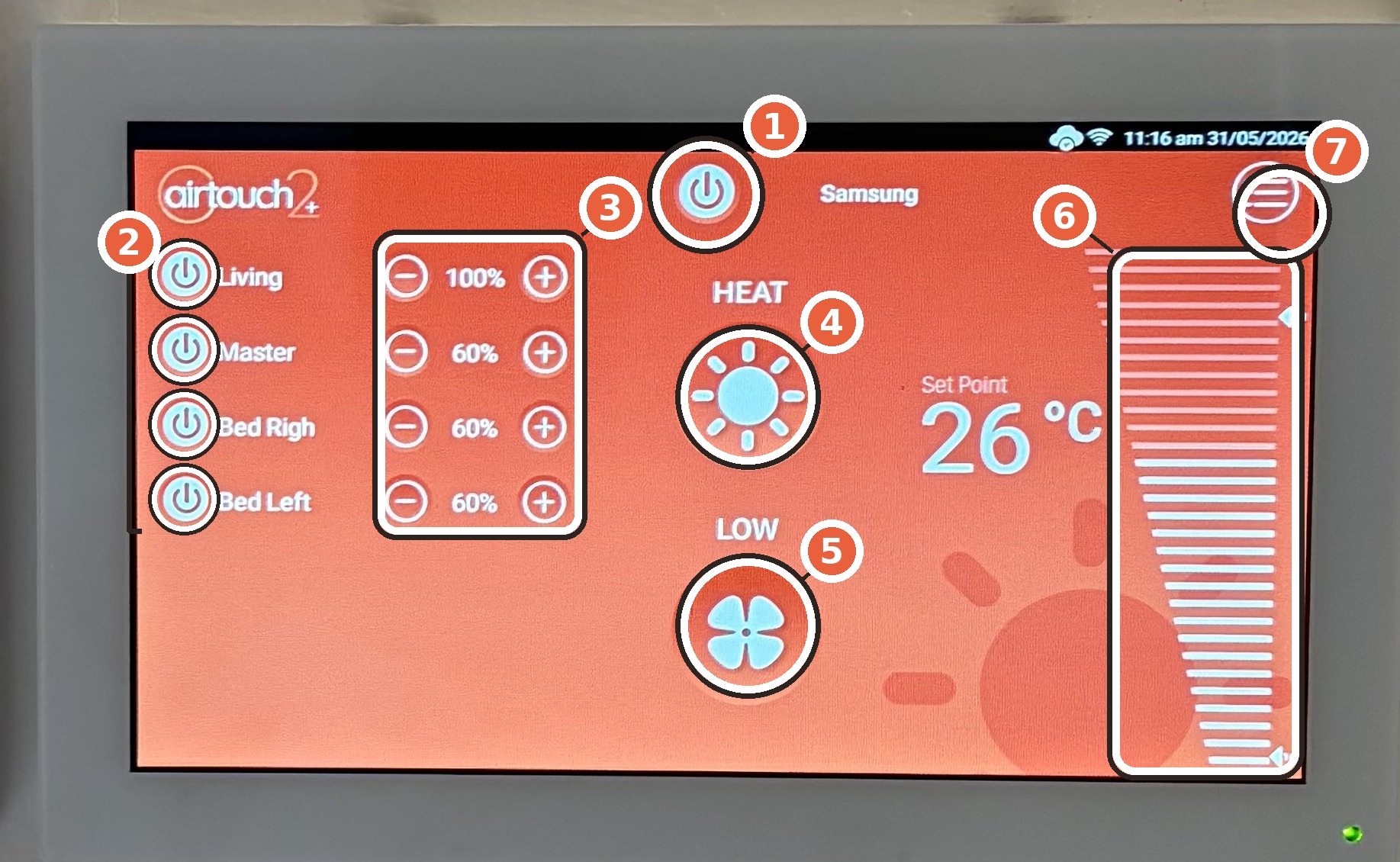
Using the wall touchscreen (in the hallway near the kitchen) — numbers match the photo above:
- Power — turns the whole system on or off
- Zone on/off — tap next to a zone name (Living, Master, Bed Right, Bed Left) to turn that zone on or off
- Airflow − / + — please leave these as set. Don't change the airflow percentage
- Mode — switches between heating (sun) and cooling (snowflake)
- Fan speed — adjusts how fast the air moves
- Temperature slider — sets your desired temperature
- Menu — additional system settings, you shouldn't need this during your stay
From your phone — Download the AirTouch 2+ app. Once connected to the home WiFi, it automatically detects the system and gives you full control from anywhere in the home.
A complimentary Nespresso machine is provided for your stay, along with a selection of tea and coffee. You'll find everything on the sage green buffet unit in the dining area — mugs are on the shelf underneath. A few pods are provided to get you started.
How to use the Nespresso:
- Fill the water tank at the back of the machine and replace it
- Place a mug under the coffee spout
- Insert a pod into the slot at the top and close the lever
- Press the small cup button for espresso, or the large cup button for lungo — the machine brews and stops automatically
- To eject the used pod, open the lever and it drops into the pod container inside
If you run out of pods, compatible capsules are available at most supermarkets including Coles and Woolworths.
A washing machine, dryer, and clothesline (in the alfresco area) are all available for your use. Laundry supplies are on top of the dryer and in the cupboard alongside.
An iron and ironing board are also available — the iron is stored on the upper shelf in the laundry, and the ironing board is in the laundry alcove.
🫧 LG Washing Machine — How to use:
- Load your clothes into the drum
- If using a laundry pod (you'll find them in a small container on top of the dryer), place it directly in the drum with the clothes — do not put pods in the drawer
- If using liquid or powder detergent, add it to the drawer — main compartment marked II for detergent, and the flower symbol slot for softener
- Close the door firmly until it clicks
- Turn the dial to select your cycle — for everyday loads we recommend AI Wash, which automatically weighs the clothes and picks the right wash settings
- Press Start/Pause twice to begin — the machine has a two-press safety start
🌀 LG Dryer — How to use:
- Check the lint filter first — it's located inside the door at the front of the drum. Pull it out, remove any lint, and replace it before every use
- Load your washed clothes into the drum and close the door
- Turn the dial to select a cycle — AI Dry is recommended for most loads as it automatically adjusts drying time and temperature
- Press Start/Pause to begin
The Westinghouse dishwasher is straightforward to use. Dishwasher tablets are stored on the shelf under the kitchen sink.
- Rinse off any large food scraps before loading
- Load dishes into the racks — plates and bowls face inward on the bottom rack, glasses and cups on the top rack
- Place a dishwasher tablet into the detergent compartment on the inside of the door and close it
- Turn the rotary dial to select your program:
- Normal — everyday wash, recommended for most loads
- ECO — energy saving, takes longer but uses less water
- Quick 30 min — lightly soiled items only
- Press Start/Pause — the machine will beep when the cycle is complete
- For best drying results, open the door about 10cm when the cycle finishes and let dishes cool for 20–30 minutes before unloading
Cleaning supplies are in the cupboards next to the pantry. Please return all products to the higher shelves after use and keep them out of reach of children at all times.
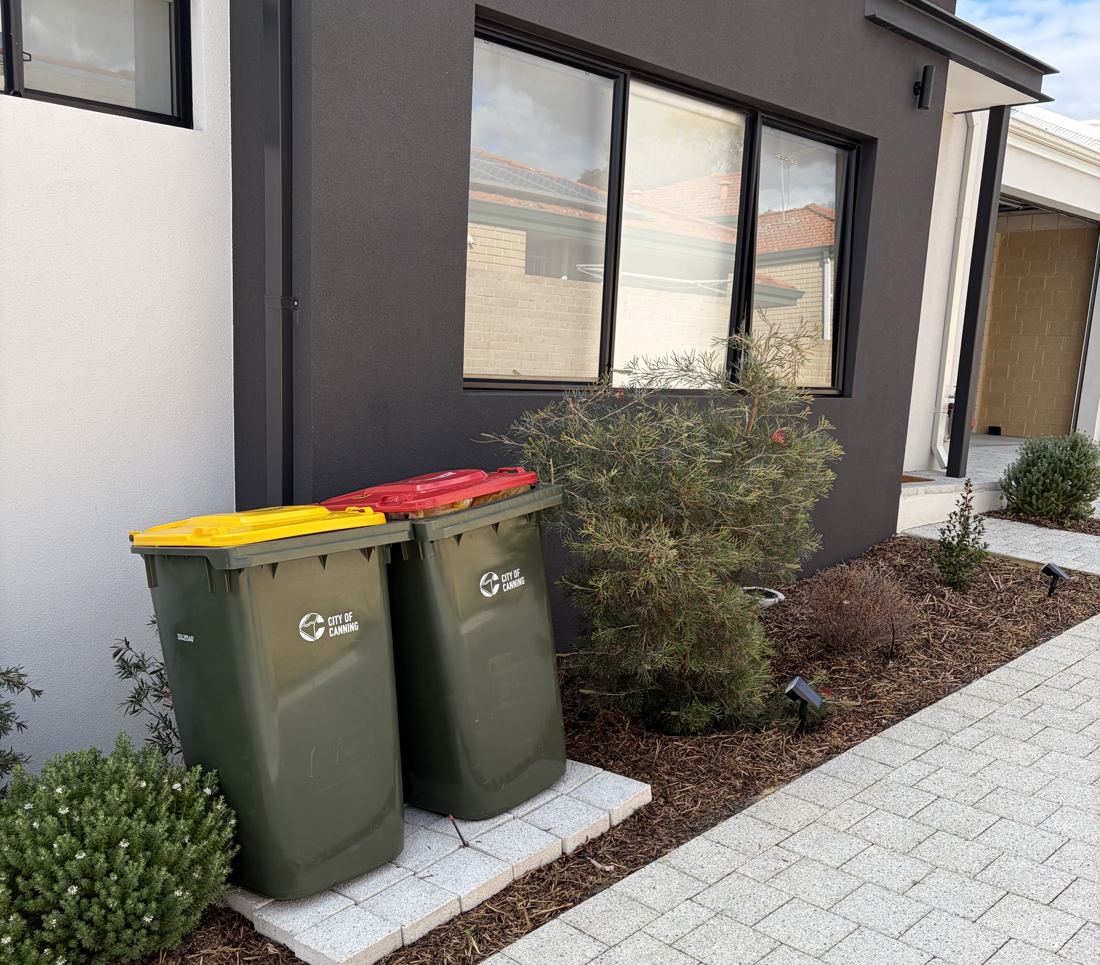
The bins are kept at the front of the house, under the living room window (see photo above). Yellow lid is recycling, red lid is general waste.
Bin collection is Tuesday morning — please put the bins out on the verge Monday evening or before 8am Tuesday.
The bedroom roller blinds are automated. You'll find the remote in a wall bracket on the bedside table — press the up/down arrows to open or close. You can also tap the small button on the window frame itself to operate them directly.
If the weather turns bad, we'd appreciate you closing the umbrella and bringing the outdoor chair cushions inside. Thank you for helping us keep the space looking great.
A selection of games has been provided for your enjoyment. These are stored inside the TV unit — just open the centre door to find them.